
Introduction to the San Francisco Interactive Whiteboard Project
In today’s fast-paced business and educational environments, traditional methods of collaboration and instruction often fail to meet modern expectations. Chalkboards, printed slides, and static presentations can limit engagement, slow communication, and reduce productivity. Modern users seek interactive, flexible, and visually engaging solutions that support real-time collaboration and information sharing.
The San Francisco Interactive Whiteboard Project was developed to help organizations—from corporate offices to schools and co-working spaces—modernize collaboration through advanced interactive display technology. By integrating high-definition interactive whiteboards into meeting rooms, classrooms, and public collaboration spaces, companies and institutions improved communication, streamlined workflows, and fostered creativity in both hybrid and in-person settings.
This project quickly became a successful example of how technology-driven collaboration tools can enhance productivity, engagement, and organizational effectiveness.

Why Interactive Whiteboards Are Becoming Essential
The Shift from Traditional Tools to Interactive Solutions
Businesses and educational institutions in San Francisco face the constant challenge of keeping teams engaged and students focused. Static presentations, printed handouts, and conventional projectors often fail to deliver dynamic interaction or real-time updates. Interactive whiteboards solve these issues by enabling real-time collaboration, multimedia integration, and remote participation, all on a single intuitive interface.
Interactive whiteboards allow users to:
Annotate content directly on the screen
Share ideas instantly with remote participants
Integrate video, slides, and applications seamlessly
Save and distribute meeting or class notes digitally
Growing Demand for Collaborative Experiences
Modern users are accustomed to technology-driven communication. From video conferencing to touch-enabled devices, people expect seamless interaction and fast access to information. Interactive whiteboards meet these expectations by providing a platform where participants can actively contribute, brainstorm, and co-create content, enhancing engagement across teams and classrooms.
In busy offices, co-working hubs, and educational campuses, interactive whiteboards stand out by creating more immersive, engaging, and productive experiences compared to traditional displays.
Corporate Applications
Enhancing Meeting Room Productivity
San Francisco companies integrated interactive whiteboards into conference rooms to modernize meetings and presentations. Teams used the boards to:
Collaborate in real-time on documents, charts, and workflows
Annotate presentations during discussions
Connect remote participants for hybrid meetings
Save and share session notes instantly
These features improved team efficiency, reduced meeting time, and encouraged active participation from all attendees.

Streamlining Internal Communication
Interactive whiteboards also supported internal corporate communication by providing dynamic dashboards and announcement boards. Offices displayed:
Company KPIs and performance metrics
Project timelines and updates
Employee recognition and news
By centralizing information and making it visually accessible, businesses fostered a more informed, engaged, and connected workforce.
Educational and Training Applications
Modernizing Classrooms
Schools and universities across San Francisco adopted interactive whiteboards to enhance teaching effectiveness and student engagement. Traditional chalkboards and printed materials were replaced with touch-enabled screens capable of integrating multimedia content. Teachers and instructors used the boards to:
Display interactive lessons and multimedia resources
Conduct live quizzes and polls
Annotate lessons in real-time
Facilitate group projects and student collaboration
Students responded positively to the interactive learning environment, resulting in higher participation rates, better knowledge retention, and improved learning outcomes.
Supporting Remote and Hybrid Learning
Interactive whiteboards also enabled seamless hybrid instruction. Educators could stream lessons to remote students, capture real-time annotations, and allow virtual participants to contribute as if they were physically present, bridging the gap between in-person and online education.
Key Features of Modern Interactive Whiteboards
High-Definition Touch Display
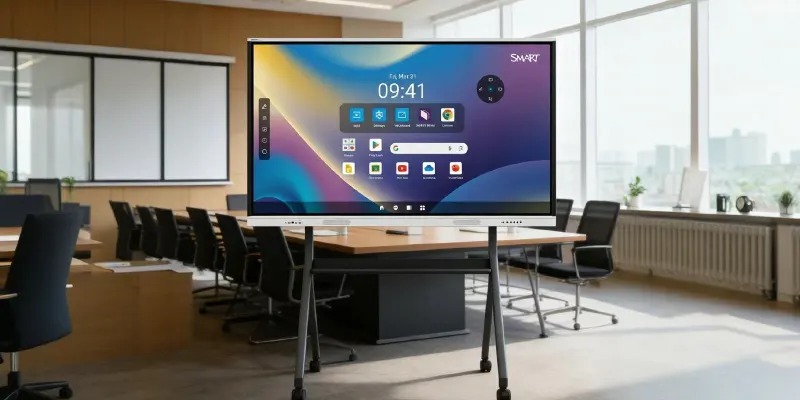
Modern interactive whiteboards provide sharp image quality, vibrant colors, and responsive touch capability, ensuring content is clearly visible and easily manipulable in any environment, from classrooms to large conference halls.
Seamless Connectivity
These boards integrate effortlessly with laptops, tablets, and cloud platforms, enabling real-time collaboration and file sharing between participants on-site and remote locations.
Interactive Tools and Software
Integrated software provides digital ink, multi-user annotation, whiteboarding templates, video conferencing integration, and session recording, enhancing interactivity and flexibility.
Centralized Content Management
Organizations can manage multiple boards from a central platform, schedule content, update educational materials, and monitor usage efficiently, reducing operational complexity and improving adoption rates.
Conclusion
The San Francisco Interactive Whiteboard Project: Transforming Collaboration and Learning Experiences demonstrated how interactive display technology can revolutionize communication, engagement, and productivity. By replacing static tools with dynamic, high-definition, and interactive solutions, businesses, educational institutions, and co-working spaces improved real-time collaboration, strengthened organizational efficiency, and created modern, engaging environments.
From corporate offices to classrooms, interactive whiteboards continue to play an essential role in enhancing collaboration, streamlining workflows, and supporting both hybrid and in-person interactions. Organizations that invest in smart, interactive display solutions are better positioned to succeed in today’s collaborative and fast-paced environment.
FAQs
1. What is an interactive whiteboard project?
An interactive whiteboard project involves installing touch-enabled displays in offices, classrooms, or public spaces to support dynamic collaboration, multimedia presentations, and real-time interaction. These boards improve communication, engagement, and productivity.
2. Why are interactive whiteboards popular in San Francisco organizations?
Organizations in San Francisco operate in competitive and innovation-driven environments. Interactive whiteboards provide real-time collaboration, multimedia integration, and intuitive interactivity that modern users expect, improving engagement and workflow efficiency.
3. How do interactive whiteboards improve collaboration?
Interactive whiteboards allow multiple participants to annotate, share, and edit content simultaneously. Remote users can connect and contribute in real-time, enhancing participation, idea generation, and decision-making.
4. Which industries benefit the most from interactive whiteboards?
Many sectors benefit, including:
Corporate offices and co-working spaces
Educational institutions (schools, universities)
Training centers and seminar venues
Healthcare facilities
Government and public institutions
These sectors use interactive whiteboards to facilitate collaboration, instruction, communication, and workflow management.