
How to Launch Digital Wayfinding Signage
Digital wayfinding signage is becoming increasingly common in large indoor environments such as shopping centers, hospitals, airports, and corporate campuses. As buildings grow more complex and visitor expectations change, traditional static maps and printed signs are often no longer sufficient. Digital displays allow organizations to guide visitors more clearly and update directions when spaces change. However, launching a digital wayfinding signage system requires planning that goes beyond simply installing screens.
1. Understanding Visitor Navigation Needs
The first step in launching digital wayfinding signage is identifying how people move through the space. In many facilities, visitors arrive with limited knowledge of the building layout. Common questions typically involve entrances, elevators, service counters, or specific departments. Mapping these navigation patterns helps determine where wayfinding displays should be placed so that guidance appears at the moments when visitors need it most.
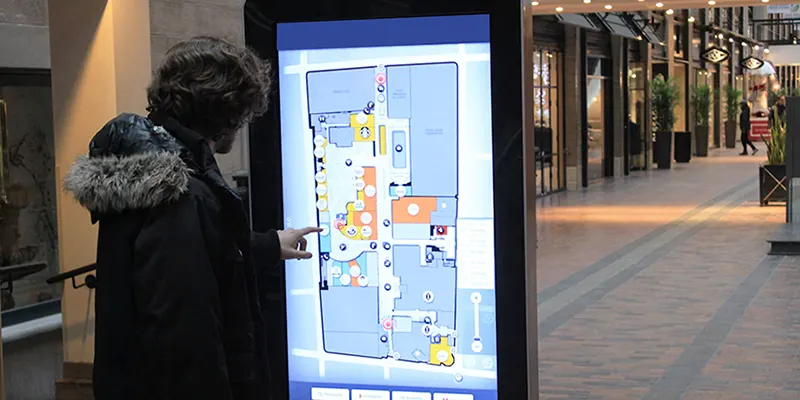
2. Identifying Strategic Screen Locations
Placement is one of the most important factors in the effectiveness of digital wayfinding signage. Screens positioned at building entrances, hallway intersections, elevator areas, and waiting zones tend to provide the greatest value. These are points where visitors often pause to make decisions about where to go next. When displays are installed at these locations, they can reduce confusion and shorten the time needed to find destinations.
3. Designing Clear and Readable Navigation Content
Digital wayfinding signage works best when information is simple and easy to interpret. Overly complex graphics or crowded layouts can make navigation harder instead of easier. Effective designs usually rely on clear directional arrows, recognizable icons, and consistent naming of locations. Many facilities also use color coding or zone markers to help visitors understand different areas within a building.
4. Integrating Real-Time Updates and Building Changes
One advantage of digital wayfinding signage is the ability to adjust directions when the environment changes. Construction projects, temporary service counters, or relocated offices can quickly make static signage outdated. With a digital system, updates can be applied centrally, ensuring that directions remain accurate across all screens. This flexibility is particularly useful in facilities where layouts evolve over time.

5. Maintaining Consistency Across Multiple Displays
Large facilities often require several displays to support navigation throughout the building. When multiple screens are used, consistency becomes essential. Digital wayfinding signage should present the same terminology, map style, and directional logic across all displays. Consistent presentation helps visitors quickly understand how to interpret the information as they move from one area to another.
Conclusion
Launching digital wayfinding signage involves more than installing digital screens. Successful systems are based on an understanding of visitor behavior, strategic screen placement, clear content design, and the ability to keep information up to date. When these elements work together, digital wayfinding signage can significantly improve how people navigate complex indoor environments.
FAQ
1. Where is digital wayfinding signage commonly used?
It is widely used in large buildings such as shopping malls, hospitals, airports, office complexes, and universities.
2. Why are digital displays used for wayfinding instead of printed maps?
Digital systems allow directions to be updated quickly when building layouts or services change.
3. What are the most effective locations for wayfinding displays?
Entrances, hallway intersections, elevators, and waiting areas are common placement points.
4. Does digital wayfinding signage require complex software?
Basic systems can operate with simple content management tools, while larger facilities may use integrated navigation platforms.
5. How many screens are typically required for a wayfinding system?
The number depends on building size, visitor flow, and the complexity of the layout.