
How to Upgrade Customer Experience With Ordering Kiosk?
The modern customer craves speed, convenience, and personalized service when interacting with restaurants or retail spaces. Ordering kiosks address these needs by offering a self-service ordering kiosks, interactive experience that empowers guests to place orders quickly and accurately. Research shows that over 60% of consumers prefer ordering kiosks, reflecting a growing demand for faster, tech-driven solutions.
However, installing a kiosk isn’t enough. To maximize impact, businesses must carefully design the ordering journey, focusing on intuitive interfaces, personalization, and seamless integration with existing operations. Done right, kiosks improve satisfaction, increase order value, and create memorable customer experiences.
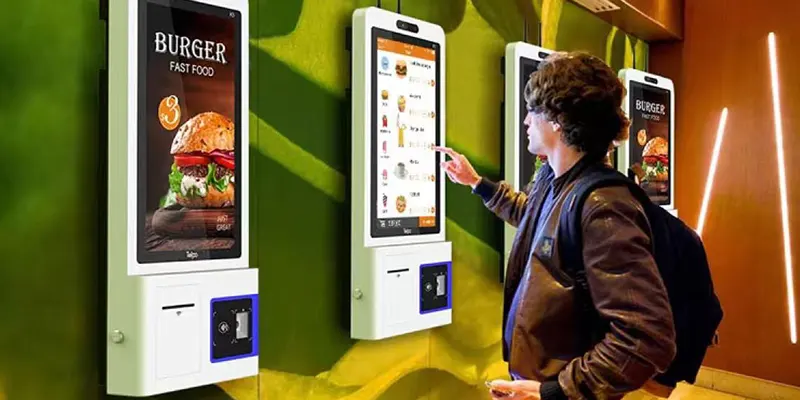
Improve Speed and Convenience
Reduce Waiting Time
Long queues create frustration, especially during peak hours. Ordering kiosks allow multiple customers to place orders at the same time, reducing congestion and wait times. This streamlined process improves efficiency, keeping guests satisfied and boosting operational flow.
Faster service also enhances customer perception. People enjoy having control over their ordering pace, and kiosks make that possible. Restaurants that implement kiosks often report up to 40% faster order processing, which positively impacts guest satisfaction.
Overall, kiosks make the ordering experience smoother, less stressful, and more enjoyable for everyone involved.
Enable Multi‑Customer Ordering
Ordering kiosks excel at handling simultaneous orders, allowing multiple customers to interact with the system at once. This is especially valuable during lunch rushes or weekends, when demand peaks.
The ability to order independently reduces crowding at the counter and decreases anxiety for guests. They no longer have to wait for a cashier, creating a more relaxed experience.
By serving multiple customers simultaneously, Ordering kiosks increase throughput while freeing staff to focus on food preparation and customer support.
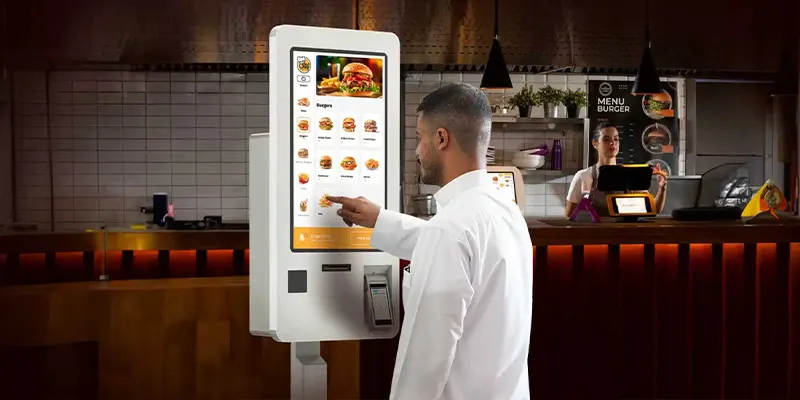
Deliver Personalized Ordering Experiences
Smart Menu Recommendations
Ordering kiosks can enhance personalization by offering smart recommendations based on previous orders or popular combinations. This automated upselling feels helpful rather than pushy, guiding customers to explore new items they might enjoy.
Research indicates that customers often spend 8–15% more when ordering via kiosks, driven by these recommendations. For example, pairing a main dish with a side and beverage subtly encourages larger purchases without overwhelming the customer.
For patrons, smart recommendations create a tailored experience that mimics attentive human service, increasing satisfaction while boosting revenue for the business.
Customization and Flexible Options
Modern diners expect to customize meals easily. Ordering kiosk allow customers to modify ingredients, choose portion sizes, or adjust preparation methods. This flexibility ensures their order matches personal tastes, dietary needs, or preferences.
Customization also gives customers a sense of control, making them feel valued. By contrast, rushing through these requests with a human cashier often leads to errors or frustration.
Businesses benefit too. Offering visible customization options through kiosks can reduce misunderstandings and improve order accuracy, enhancing overall efficiency and reducing waste.
Loyalty and Customer Data Integration
Integrating ordering kiosk with loyalty programs and customer databases adds another layer of personalization. Returning customers can log in, see their favorite items, and receive targeted promotions.
Ordering kiosk familiarity builds trust and encourages repeat visits. Customers feel recognized and valued when the kiosk remembers their preferences, creating a more engaging and personalized journey.
For businesses, data collected through ordering kiosk provides insights into customer behavior, helping optimize menus, marketing strategies, and promotional campaigns over time.
Increase Engagement With Visual and Interactive Design
High‑Quality Food Imagery
Visual appeal is critical for engaging customers. High-resolution food images on ordering kiosks entice guests and help them make confident choices. Images communicate portion size, presentation, and ingredients in a way words alone cannot.
This visual approach also encourages impulse purchases. When desserts or drinks are showcased attractively, customers are more likely to add them to their order.
Beyond sales, appealing visuals create a more immersive and enjoyable ordering experience, enhancing brand perception and satisfaction.
Interactive Menu Navigation
Interactive menus allow customers to filter by preferences, explore categories, and access detailed information like nutritional facts or ingredient lists. This functionality transforms ordering into a more engaging digital experience rather than a simple transaction.
Filters for dietary restrictions such as vegetarian, vegan, or gluten-free ensure accessibility for all guests, saving time and reducing frustration.
Layered information also provides transparency, helping customers make informed decisions. The result is an empowered customer who feels in control of their choices.
Multilingual and Accessible Interfaces
Ordering kiosk can cater to diverse audiences with multilingual options and accessibility features. Language selection buttons allow non-native speakers to navigate menus effortlessly.
Accessibility features like voice guidance, adjustable text sizes, and simple layouts ensure inclusivity for older customers or individuals with disabilities.
By addressing language and accessibility needs, businesses create a welcoming environment, improving satisfaction and fostering loyalty across a broader demographic.
Integrate Kiosks With Overall Service Experience
Seamless Payment and Checkout
Payment flexibility is essential for convenience. Ordering kiosk typically support credit cards, mobile wallets, and contactless payments, allowing customers to complete transactions quickly and efficiently.
A smooth checkout process reduces friction and makes the entire experience faster. Customers appreciate knowing their order is confirmed and can track it digitally, which adds peace of mind.
This efficiency improves throughput, reduces lines, and enhances the overall perception of service quality.
Integration With Mobile and Online Ordering
Integrating ordering kiosks with mobile apps and online platforms provides a consistent omnichannel experience. Customers can begin an order on their phone and complete it at the kiosk or vice versa.
Synchronization across platforms allows for uniform promotions, loyalty rewards, and customer data, enhancing brand engagement.
Omnichannel integration ensures that customers have a seamless, connected experience, regardless of where or how they start their order.
Staff Support and Hybrid Service
Ordering kiosks work best alongside staff in a hybrid service model. Employees can guide first-time users, answer questions, and troubleshoot technical issues.
This balance ensures that even those unfamiliar with technology feel comfortable using kiosks, while staff are freed to focus on customer support, food quality, and hospitality.
By combining digital efficiency with human service, businesses create a well-rounded, satisfying experience that appeals to all types of customers.
Conclusion
Ordering kiosks transform the customer experience by reducing wait times, offering personalization, and providing interactive engagement. Integration with loyalty programs, mobile platforms, and supportive staff ensures a seamless journey. When designed thoughtfully, kiosks improve operational efficiency, increase revenue, and strengthen customer relationships, making them an essential tool for modern restaurants and retail spaces.
FAQs
1. What is an ordering kiosk?
An ordering kiosk is a self-service digital terminal where customers can browse menus, customize orders, and complete payments independently.
2. How do kiosks enhance customer experience?
They reduce wait times, allow for personalization, and provide interactive menus, creating a faster, more enjoyable experience.
3. Can kiosks increase revenue?
Yes. Upselling prompts and attractive visuals encourage additional purchases, often increasing order value by 8–15%.
4. Are kiosks easy to use?
Most kiosks feature touch-friendly, intuitive interfaces familiar to smartphone users, making them easy for all customers.
5. Do kiosks replace restaurant staff?
No. Kiosks complement staff, allowing employees to focus on hospitality, order accuracy, and personalized service.