
The Classroom Guide to Interactive Whiteboards
What makes interactive whiteboards so appealing? Imagine replacing a simple marker board with a giant touch-enabled learning hub that can display videos, launch educational apps, allow students to interact directly with content, and instantly save classroom notes. Instead of merely presenting information, teachers can create immersive experiences that encourage participation and deeper understanding. In an era where students grow up surrounded by digital devices, interactive whiteboards bridge the gap between traditional teaching methods and modern learning expectations.
Understanding Interactive Whiteboards
What Is an Interactive WhiteboarId?
An interactive whiteboard is a digital display that combines the functionality of a traditional whiteboard with the power of a computer. Teachers and students can write, draw, move objects, and interact with digital content directly on the screen using touch gestures or a stylus.
Unlike conventional whiteboards, interactive whiteboards support multimedia content such as videos, presentations, websites, and educational apps. This allows educators to create more engaging lessons and present information in a visually appealing way.
How Interactive Whiteboards Work
Interactive whiteboards operate through touch-sensitive technology that detects user input and communicates it to a connected computer or built-in operating system. Depending on the model, users can control applications, navigate webpages, and annotate documents directly on the display.
Most modern interactive whiteboards also include wireless connectivity, cloud storage integration, and screen-sharing capabilities. These features make it easier for teachers to access resources and collaborate with students during lessons.
Key Components of an Interactive Whiteboard
A typical interactive whiteboard consists of a display panel, touch technology, processing hardware, and educational software. Together, these components create a complete teaching and learning solution.
Additional accessories such as stylus pens, cameras, microphones, and mobile device integration can further enhance classroom functionality. Schools often choose systems based on their specific teaching requirements and technology infrastructure.
Benefits of Interactive Whiteboards in Education
Increasing Student Engagement
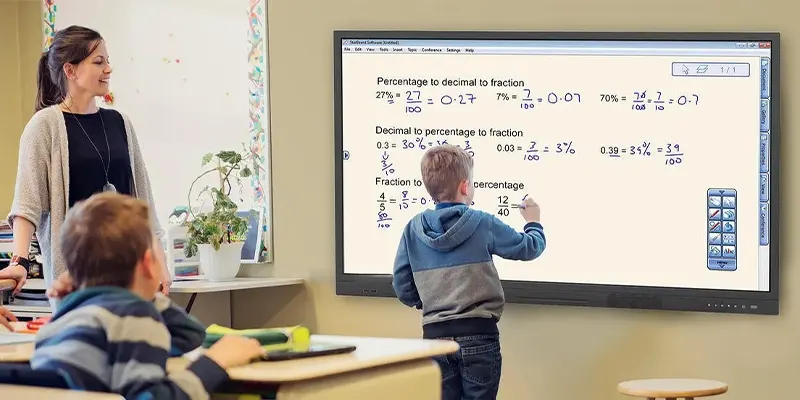
Interactive whiteboards encourage active participation by allowing students to interact directly with lesson content. Instead of simply watching a presentation, learners can solve problems, move objects, and contribute ideas on the screen.
This hands-on approach helps maintain attention and makes lessons more enjoyable. Students are often more motivated when technology is incorporated into their learning experiences.
Supporting Different Learning Styles
Every student learns differently. Some prefer visual content, while others benefit from auditory explanations or hands-on activities. Interactive whiteboards accommodate these different learning preferences by combining text, images, videos, and interactive exercises.
Teachers can easily adapt lessons to suit diverse classroom needs. As a result, more students can understand and retain information effectively.
Enhancing Collaboration and Teamwork
Interactive whiteboards make group activities more engaging by providing a shared digital workspace. Multiple students can collaborate on projects, participate in brainstorming sessions, and solve problems together.
This collaborative environment encourages communication, critical thinking, and teamwork skills. These abilities are valuable not only in school but also in future careers.
Improving Lesson Flexibility
Teachers can quickly switch between different types of content without interrupting the flow of a lesson. A presentation can seamlessly transition into a video, online quiz, or interactive activity.
This flexibility allows educators to respond to student questions and interests in real time. Lessons become more dynamic and adaptable to classroom needs.
Essential Features to Look For
Multi-Touch Functionality
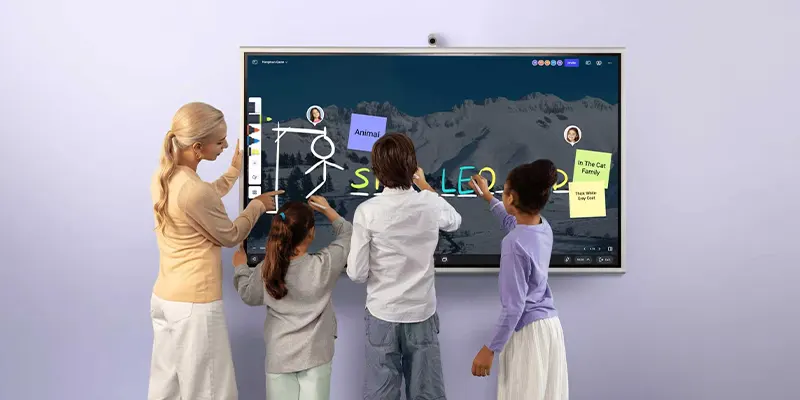
Multi-touch technology allows several users to interact with the display simultaneously. This feature is particularly useful for collaborative learning activities and group projects.
Students can work together on the same screen, making lessons more interactive and encouraging participation from multiple learners at once.
High-Resolution Display
A high-resolution screen ensures that text, images, and videos appear clear and easy to read. This is especially important in larger classrooms where students may be seated far from the display.
Sharp visuals improve the overall learning experience and help students focus on important information without visual distractions.
Wireless Connectivity and Screen Sharing
Modern interactive whiteboards often support wireless connections with laptops, tablets, and smartphones. Teachers and students can share content directly from their devices without needing cables.
This feature simplifies classroom presentations and encourages student participation by making it easy to display individual work on the main screen.
Educational Software Integration
Many interactive whiteboards include specialized software designed for teaching and learning. These programs provide tools for lesson creation, annotation, assessment, and collaboration.
Choosing a whiteboard with strong software support can significantly enhance its educational value and make lesson preparation more efficient.
Best Practices for Classroom Success
Planning Interactive Lessons
Successful use of interactive whiteboards starts with thoughtful lesson planning. Teachers should identify opportunities where technology can enhance understanding rather than simply replace traditional teaching methods.
Interactive activities should have clear learning objectives and encourage student participation. Well-planned lessons help maximize the benefits of the technology.
Encouraging Student Participation
Interactive whiteboards are most effective when students actively engage with them. Teachers can invite learners to solve problems, annotate content, and contribute ideas during lessons.
Regular participation helps students build confidence while creating a more collaborative and engaging classroom environment.
Providing Teacher Training
Even the most advanced technology requires proper training. Educators should receive ongoing professional development to learn new features and best practices for classroom integration.
Well-trained teachers are more likely to use interactive whiteboards effectively and creatively, leading to better educational outcomes for students.
Preparing for Future Classroom Technology
Interactive whiteboards continue to evolve with advancements in artificial intelligence, cloud computing, and collaborative software. Schools that invest in adaptable systems can benefit from future upgrades and new capabilities.
By staying informed about emerging technologies, educators can ensure their classrooms remain innovative and prepared for the changing landscape of digital education.
Conclusion
Interactive whiteboards have become valuable tools for modern education, transforming traditional classrooms into engaging and collaborative learning environments. Their ability to combine multimedia content, touch interaction, and real-time collaboration helps teachers create more effective lessons and improve student participation.
As educational technology continues to advance, interactive whiteboards will play an increasingly important role in supporting digital learning. Schools that implement these solutions thoughtfully can create richer educational experiences and better prepare students for the future.
FAQs
1. What is the main purpose of an interactive whiteboard?
The main purpose is to make lessons more interactive, engaging, and collaborative by allowing users to interact directly with digital content.
2. Are interactive whiteboards suitable for all subjects?
Yes. They can be used effectively in mathematics, science, language arts, social studies, and many other subjects.
3. Do interactive whiteboards require internet access?
Internet access is not always required, but it enhances functionality by providing access to online resources, cloud storage, and educational platforms.
4. Can students use interactive whiteboards?
Yes. Students can write, draw, solve problems, and collaborate directly on the screen, making learning more interactive.
5. How long do interactive whiteboards typically last?
Most high-quality interactive whiteboards can last between seven and ten years or longer with proper maintenance and regular software updates.