
Using Interactive Flat Panels in Corporate Meeting Rooms: Improving Team Collaboration and Productivity
1. What Are Interactive Flat Panels?
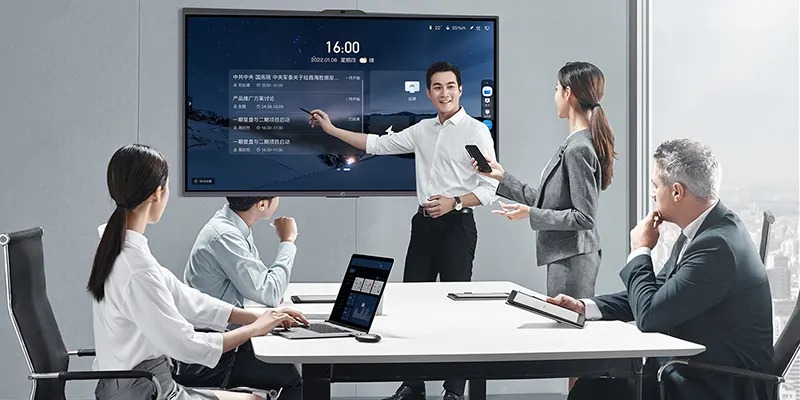
Interactive Flat Panels (IFPs) are advanced touchscreen displays designed to improve communication and collaboration in professional environments. Combining the functionality of a whiteboard, computer, presentation screen, and collaboration platform, these devices allow users to write, annotate, share content, and interact directly with on-screen materials. As organizations continue adopting digital workplace strategies, interactive flat panels have become an essential part of modern conference rooms.
Unlike traditional projectors and whiteboards, interactive flat panels provide a more seamless and engaging experience. Employees can connect devices wirelessly, collaborate in real time, and save meeting content instantly. This reduces technical interruptions and helps teams focus on productive discussions rather than managing equipment.
2. Why Modern Meeting Rooms Need Interactive Technology
Supporting Hybrid Collaboration
The rise of hybrid work has transformed how businesses communicate. Teams often consist of both in-office and remote employees, making effective collaboration tools more important than ever. Interactive flat panels help bridge this gap by enabling real-time content sharing, digital whiteboarding, and seamless video conferencing integration.
Remote participants can view annotations, contribute ideas, and engage in discussions just as effectively as those sitting in the meeting room. This creates a more inclusive meeting environment and ensures everyone remains connected regardless of location.
Replacing Traditional Meeting Tools
Traditional meeting rooms often rely on multiple devices, including projectors, whiteboards, speakers, and separate conferencing systems. Interactive flat panels consolidate these functions into a single solution. This simplifies room setup, reduces maintenance requirements, and improves the overall meeting experience.
By eliminating cable clutter and connectivity issues, organizations can save valuable time and create more efficient collaboration spaces.
3. Benefits of Interactive Flat Panels
Enhanced Team Collaboration
Interactive flat panels encourage active participation. Multiple users can interact with the display simultaneously, making brainstorming sessions, project planning, and strategy discussions more engaging. Team members can annotate documents, create diagrams, and organize ideas together in real time.
The ability to save and share meeting content instantly also improves collaboration beyond the meeting itself. Teams can revisit ideas, track progress, and maintain continuity across projects.
Improved Employee Engagement
Meetings become more interactive when participants can contribute directly to the discussion. Instead of passively viewing presentations, employees can engage with content through touch-based interaction, digital note-taking, and collaborative exercises.
This increased involvement often leads to better information retention and more productive conversations. Employees feel more connected to discussions when they actively participate in the process.
Faster Decision-Making
Interactive flat panels centralize information and collaboration tools, allowing teams to review data, discuss options, and make decisions more efficiently. Real-time annotations and content sharing help eliminate communication delays and reduce the need for follow-up meetings.
When everyone has immediate access to the same information, discussions become clearer and decision-making becomes faster.

Better Meeting Documentation
One common challenge with traditional whiteboards is preserving information after meetings end. Interactive flat panels solve this problem by enabling users to save notes, annotations, diagrams, and presentations digitally.
Meeting outcomes can be distributed instantly to participants, improving accountability and ensuring important information remains accessible for future reference.
4. Key Features to Look For
Touchscreen Performance
A responsive multi-touch display is essential for effective collaboration. High-quality panels allow multiple users to write, draw, and interact simultaneously, creating a more natural teamwork experience.
Wireless Screen Sharing
Wireless connectivity enables employees to share content directly from laptops, tablets, and smartphones without the need for cables or adapters. This feature streamlines presentations and reduces setup time.
Video Conferencing Integration
Many modern interactive flat panels include built-in cameras, microphones, and compatibility with platforms such as Zoom and Microsoft Teams. These features support seamless hybrid meetings and improve communication between distributed teams.
5. Choosing the Right Interactive Flat Panel
Display Size Considerations
Selecting the appropriate display size depends on room dimensions and audience size. Smaller meeting rooms typically perform well with 65-inch displays, while larger conference rooms may require 75-inch, 86-inch, or larger models to ensure clear visibility.
Software Compatibility
Organizations should choose interactive flat panels that integrate with their existing collaboration tools, cloud storage platforms, and conferencing software. Strong compatibility ensures a smoother user experience and faster adoption.
6. Future Trends
AI-Powered Collaboration
Artificial intelligence is beginning to play a larger role in meeting room technology. Features such as automatic meeting summaries, voice transcription, language translation, and intelligent content organization are making collaboration more efficient.
As AI capabilities continue to evolve, interactive flat panels will become even more valuable as central hubs for workplace communication and productivity.
7. Conclusion
Interactive flat panels are transforming corporate meeting rooms by making collaboration more engaging, efficient, and inclusive. Their combination of touchscreen functionality, wireless connectivity, and conferencing integration helps organizations support hybrid work while improving productivity.
Businesses that invest in interactive flat panel technology can create smarter meeting environments where teams communicate more effectively, make decisions faster, and collaborate without barriers.
8. FAQs
1. What is an interactive flat panel?
An interactive flat panel is a touchscreen display that combines presentation, collaboration, and whiteboarding capabilities into one device.
2. How do interactive flat panels improve meetings?
They enable real-time collaboration, wireless content sharing, and seamless communication between in-person and remote participants.
3. Are interactive flat panels suitable for hybrid work?
Yes. They integrate with popular video conferencing platforms and support collaborative digital workspaces.
4. What display size should I choose?
The ideal size depends on room dimensions, viewing distance, and the number of participants.
5. What is the biggest advantage of interactive flat panels?
Their ability to improve collaboration, engagement, and productivity within a single integrated solution.