
Everything You Need to Know Before Buying a Self-service Kiosk
1. What Is a Self-Service Kiosk?
A self-service kiosk is a digital terminal that allows customers to complete tasks without employee assistance. Customers can place orders, check in, print tickets, make payments, or access information directly through the kiosk interface.
You can find kiosks almost everywhere today. Restaurants use them for self-ordering, airports use them for check-ins, and retail stores use them for self-checkout. Businesses like kiosks because they improve speed and reduce pressure on employees during busy hours.
There are different kiosk styles available depending on the business environment. Some companies choose wall-mounted kiosks to save space, while others use larger floor-standing models for high-traffic locations. Tablet kiosks are also popular among small businesses because they are affordable and easy to install.
The growing popularity of kiosks is closely connected to changing customer behavior. People now expect faster service, shorter lines, and convenient digital experiences. Businesses that adapt to these expectations often gain a competitive advantage.
2. What Is a Self-Service Kiosk?
A self-service kiosk is a digital terminal that allows customers to complete tasks without employee assistance. Customers can place orders, check in, print tickets, make payments, or access information directly through the kiosk interface.
You can find kiosks almost everywhere today. Restaurants use them for self-ordering, airports use them for check-ins, and retail stores use them for self-checkout. Businesses like kiosks because they improve speed and reduce pressure on employees during busy hours.
There are different kiosk styles available depending on the business environment. Some companies choose wall-mounted kiosks to save space, while others use larger floor-standing models for high-traffic locations. Tablet kiosks are also popular among small businesses because they are affordable and easy to install.
The growing popularity of kiosks is closely connected to changing customer behavior. People now expect faster service, shorter lines, and convenient digital experiences. Businesses that adapt to these expectations often gain a competitive advantage.
3. Important Features to Look For
Before buying a kiosk, businesses should carefully evaluate the most important features. The touchscreen is one of the biggest factors because customers interact with it constantly. A slow or unresponsive screen can quickly frustrate users.
Payment integration is equally important. Modern customers expect flexible payment options including credit cards, mobile wallets, tap-to-pay systems, and QR code payments. A kiosk should support multiple payment methods to create a seamless checkout experience.
Software compatibility is another critical consideration. The kiosk should integrate smoothly with your existing POS system, inventory management software, and customer loyalty programs. Poor integration can create operational problems and inaccurate reporting.
Here is a simple comparison of essential kiosk features:
| Feature | Why It Matters |
|---|---|
| Responsive touchscreen | Improves customer interaction |
| Contactless payments | Supports modern payment habits |
| POS integration | Streamlines operations |
| Durable hardware | Reduces maintenance costs |
| Cloud management | Allows remote updates |
Businesses should also consider accessibility features such as large text, audio support, and wheelchair-friendly designs to improve usability for all customers.
4. Different Types of Kiosk Hardware
Choosing the right kiosk hardware depends on your business goals, available space, and customer traffic.
Wall-mounted kiosks are ideal for smaller spaces because they save floor area while still providing convenient customer access. These are commonly used in healthcare facilities and transportation hubs.
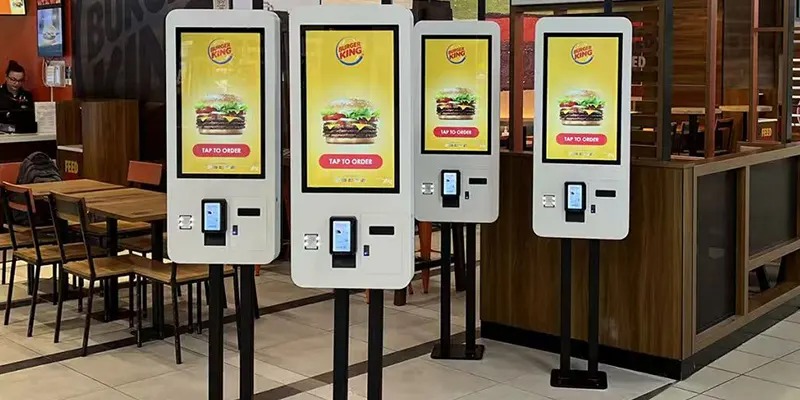
Floor-standing kiosks are the most common option in restaurants, cinemas, and retail stores. They are highly visible and often include integrated payment systems, printers, and scanners. These kiosks work well in high-traffic environments.
Tablet kiosks are a more affordable option for small businesses. They are flexible, lightweight, and easy to deploy. However, they may not be as durable as commercial-grade kiosk systems in busy environments.
Durability is extremely important when choosing kiosk hardware. Public-use kiosks operate continuously and must handle heavy daily usage. Investing in commercial-grade equipment often reduces repair and replacement costs over time.
5. Understanding Kiosk Costs
Many businesses underestimate the true cost of owning a self-service kiosk. The initial hardware price is only one part of the total investment.
Basic tablet kiosks may cost a few hundred dollars, while advanced commercial kiosks with payment terminals, printers, and scanners can cost several thousand dollars each. Installation costs may also include networking, mounting, branding customization, and system integration.
Software expenses are another important factor. Many kiosk providers charge monthly or annual fees for cloud management, analytics, and software updates. Payment processing fees can also add ongoing costs.
Maintenance should never be overlooked. Touchscreens, printers, and payment systems occasionally require repairs or updates. Businesses should plan for ongoing technical support to avoid downtime and customer frustration.
Even with these costs, kiosks often provide strong long-term value by improving efficiency, reducing labor pressure, and increasing average order sizes.
6. Common Mistakes to Avoid
One of the biggest mistakes businesses make is focusing only on price instead of long-term performance. Cheap hardware may fail quickly in busy environments, leading to higher maintenance costs and customer complaints.
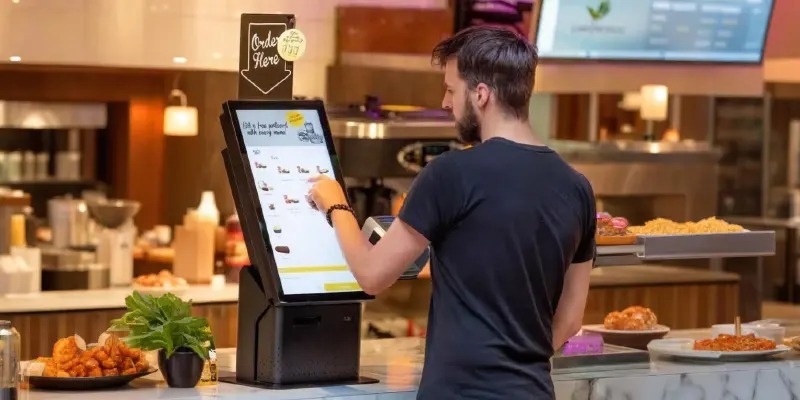
Another common problem is poor user experience design. Complicated menus, slow software, and confusing navigation can discourage customers from using the kiosk. Simplicity and speed are essential for successful adoption.
Businesses also make mistakes by placing kiosks in poor locations. A kiosk hidden in a corner or blocking customer traffic can reduce usability and create operational issues.
Many companies forget that kiosks still require employee support. Staff should be available to help first-time users and assist when technical issues occur. The best kiosk systems improve customer service rather than completely replacing human interaction.
7. Common Mistakes to Avoid
One of the biggest mistakes businesses make is focusing only on price instead of long-term performance. Cheap hardware may fail quickly in busy environments, leading to higher maintenance costs and customer complaints.
Another common problem is poor user experience design. Complicated menus, slow software, and confusing navigation can discourage customers from using the kiosk. Simplicity and speed are essential for successful adoption.
Businesses also make mistakes by placing kiosks in poor locations. A kiosk hidden in a corner or blocking customer traffic can reduce usability and create operational issues.
Many companies forget that kiosks still require employee support. Staff should be available to help first-time users and assist when technical issues occur. The best kiosk systems improve customer service rather than completely replacing human interaction.
8. Conclusion
Self-service kiosks have become an important tool for businesses looking to improve efficiency and customer experience. They help reduce wait times, support faster transactions, and create more convenient service environments.
Before buying a kiosk, businesses should carefully evaluate hardware quality, software integration, payment options, maintenance requirements, and long-term scalability. Choosing the right system can improve operations and increase customer satisfaction for years to come.
The demand for self-service technology continues growing across industries, and businesses that adopt modern kiosk solutions are positioning themselves for a more automated and customer-focused future.
9. FAQs
1. How much does a self-service kiosk cost?
The cost depends on the kiosk type and features. Basic systems may cost a few hundred dollars, while advanced commercial kiosks can cost several thousand dollars.
2. Are kiosks good for small businesses?
Yes. Many small businesses use tablet-based kiosks because they are affordable and easy to manage.
3. Do kiosks increase sales?
In many cases, yes. Kiosks promote upselling and encourage customers to explore additional products or upgrades.
4. Which industries use self-service kiosks the most?
Restaurants, retail stores, airports, hospitals, cinemas, and hotels commonly use kiosks.
5. What is the biggest factor when choosing a kiosk?
Software reliability and user experience are among the most important factors because they directly affect customer satisfaction.