
How to Choose Digital Signage for Offices?
Digital signage has become an essential communication tool in modern office environments. Instead of relying solely on emails or printed notices that are often overlooked, digital signage delivers information in a visual, engaging, and real-time format. It helps organizations share updates quickly, maintain consistency in messaging, and create a more connected workplace across different departments and locations.
Beyond basic announcements, office digital signage supports a wide range of uses, including welcoming visitors, displaying company achievements, sharing key performance indicators, and promoting internal events. By placing screens in high-traffic areas such as lobbies, corridors, meeting rooms, and break areas, businesses can ensure that important messages reach employees naturally during their daily routines.
What Is Digital Signage for Offices?
Digital signage for offices refers to the use of digital screens within the workplace to display dynamic, centrally managed content. These screens are used to share information such as company announcements, meeting room schedules, performance data, event reminders, and welcome messages for visitors. Unlike static posters or printed notices, digital signage for offices allows content to be updated instantly, ensuring information is always current and relevant.
By combining displays, media players, and content management software, office digital signage creates a flexible communication system that can be tailored to different areas and audiences. Whether placed in lobbies, hallways, or common areas, it helps improve information visibility, strengthen internal communication, and support a more connected and efficient office environment.
Why Digital Signage Matters in the Workplace?
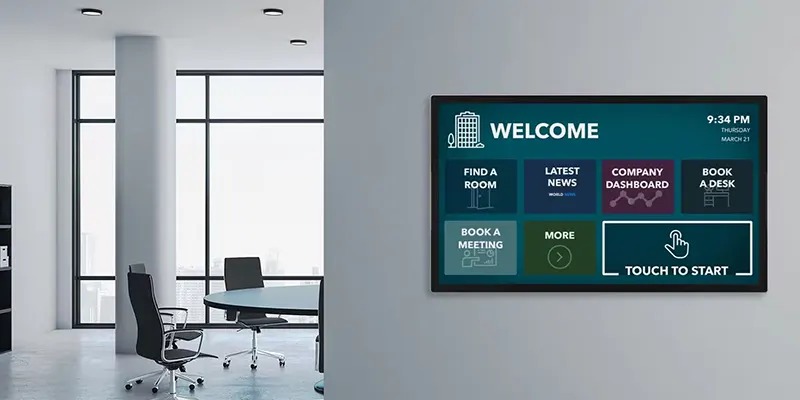
Digital signage matters in the workplace because it delivers important information in a clear, visual, and timely way. In busy office environments where emails and messages are often missed, digital screens capture attention naturally and ensure key updates are seen. This improves internal communication, reduces misunderstandings, and keeps employees informed without interrupting their workflow.
Beyond information sharing, digital signage also supports company culture and engagement. By highlighting achievements, promoting events, and reinforcing brand values, it helps create a more connected and motivated workplace. At the same time, real-time updates and centralized control make digital signage a practical, efficient tool for modern offices.
Defining Your Office Needs
Before shopping for screens or software, pause and ask yourself a simple question: What problem am I trying to solve?
Defining Clear Objectives
Defining clear objectives is the first and most important step when planning digital signage for offices. Before choosing screens or software, organizations need to understand what they want to achieve—whether it’s improving internal communication, sharing real-time updates, enhancing visitor experience, or reinforcing company culture. Clear goals help ensure the signage system serves a real purpose rather than becoming just another screen on the wall.
When objectives are well defined, decisions about content, placement, and technology become much easier. It also allows teams to measure success more effectively, ensuring the digital signage delivers meaningful value and supports everyday workplace operations.
Branding and Culture Building
Digital signage for offices plays an important role in strengthening branding and building a positive workplace culture. By consistently displaying brand visuals, company values, and key messages, digital screens help reinforce a unified identity across the office. This creates a professional, modern atmosphere that leaves a strong impression on both employees and visitors.
In addition, digital signage for offices can highlight employee achievements, celebrate milestones, and promote internal events, making staff feel recognized and connected. Over time, this shared visual storytelling supports a sense of belonging, boosts morale, and helps turn company culture into something employees see and experience every day.
Identifying Target Audiences
Identifying the target audience is essential for creating effective office digital signage. Different groups—such as employees, management, visitors, or partners—have different information needs. Understanding who will view the screens helps determine what content to display, the tone of messaging, and where the screens should be placed.
For example, lobby displays may focus on branding and welcome messages for visitors, while screens in staff areas can share internal updates, KPIs, or team achievements. By tailoring content to specific audiences, digital signage becomes more relevant, engaging, and impactful throughout the workplace.
Types of Digital Signage for Offices
Offices use different types of digital signage depending on space, purpose, and audience. Each type is designed to support specific communication needs, from welcoming visitors to keeping employees informed. Choosing the right type ensures information is delivered clearly and efficiently in every area of the workplace.
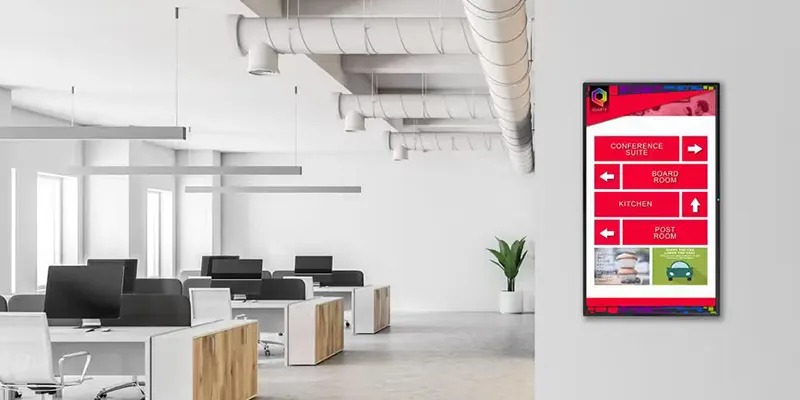
Common digital signage for offices includes lobby and reception displays for branding and greetings, meeting room screens for scheduling and availability, wayfinding displays to help people navigate larger offices, and internal communication boards for company news and updates. Together, these signage types create a connected, organized, and more engaging office environment.
Placement and Installation Considerations
Where you place your digital signage is just as important as the content it displays. Poor placement can make even the best content invisible, while strategic positioning ensures messages are noticed, read, and acted upon. Thinking carefully about location, height, and lighting will maximize engagement and effectiveness.
Wall-Mounted vs Freestanding Displays
Wall-mounted displays are perfect for saving floor space and creating a clean, professional look. They are ideal for lobbies, corridors, or meeting rooms where screens need to remain stationary. Freestanding units, on the other hand, offer mobility and flexibility, making them suitable for open office areas, temporary events, or spaces where layouts frequently change. Choosing the right type depends on your office layout and communication needs.
Viewing Distance and Height
For digital signage for offices to be effective, screens should be installed at a height that matches the average eye level of viewers. Additionally, content must be legible from the typical viewing distance—too small or placed too high or low, and people may simply ignore it. Proper positioning ensures maximum visibility and that messages are easily consumed without straining the eyes.
Indoor Lighting Conditions
Lighting can make or break your digital signage visibility. Direct sunlight, bright overhead lights, or reflective surfaces can create glare, making content hard to read. To prevent this, screens should be positioned away from strong light sources or use displays with higher brightness levels. This ensures your content remains clear, vibrant, and engaging throughout the workday.
Conclusion
Choosing the right digital signage for offices goes beyond picking a screen—it’s about creating a communication system that informs, engages, and connects everyone in the workplace. By carefully considering objectives, audience, content, hardware, and placement, offices can ensure their signage is both effective and visually appealing.
When implemented thoughtfully, digital signage enhances internal communication, reinforces company culture, supports productivity, and even leaves a lasting impression on visitors. It transforms static spaces into dynamic, interactive environments, making information accessible, timely, and engaging for everyone. The result is a smarter, more connected, and visually compelling workplace.
FAQs
1. What is the best screen size for office digital signage?
It depends on location. Lobbies need larger screens, while meeting rooms work well with smaller displays.
2. Do offices really need commercial-grade displays?
Yes. Commercial displays are built for long hours and offer better reliability.
3. How often should digital signage content be updated?
Ideally weekly, or whenever important updates occur.
4. Is cloud-based digital signage secure for offices?
Yes, when combined with proper access control and network security.
5. Can digital signage integrate with office calendars?
Absolutely. Many platforms support real-time calendar integration.