
What Is a Digital Kiosk Machine?
Walk into any retail store or fast food chain today and you will likely encounter a digital kiosk. But what exactly is a digital kiosk machine and why are businesses installing them everywhere? A digital kiosk machine is a standalone interactive terminal that lets users place orders, make payments, or complete other tasks without staff assistance. These self service stations have become essential for businesses streamlining operations and improving customer experience. The global digital kiosk market is projected to reach $38.3 billion by 2027 according to Grand View Research, driven by labor costs and consumer demand for speed. This article explains what a digital kiosk machine is, how it works, and why it matters.
1. Defining the Digital Kiosk Machine
A digital kiosk machine is an electronic terminal with a display, touch interface, and onboard computer providing self service functionality. Unlike a standard computer, it is built for public use with durable enclosures and industrial grade components. The term covers devices from small countertop ordering units to large outdoor information stations.
Core components include a display panel, touch sensor, embedded computer, and protective enclosure. Many units also include payment terminals, printers, and barcode scanners depending on the application. Internet connectivity allows the unit to communicate with backend systems for inventory, payments, and content updates. What distinguishes a digital kiosk machine from a regular computer is purpose built software that presents focused options rather than a full desktop. The interface is simplified for quick task completion and can be managed remotely.
2. Common Types of Digital Kiosk Machines
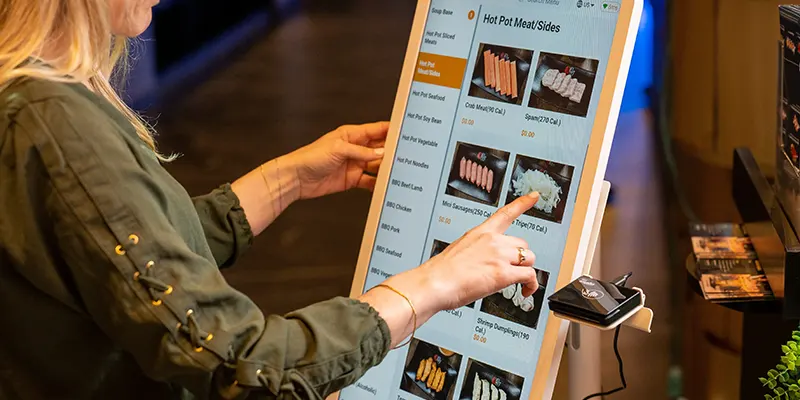
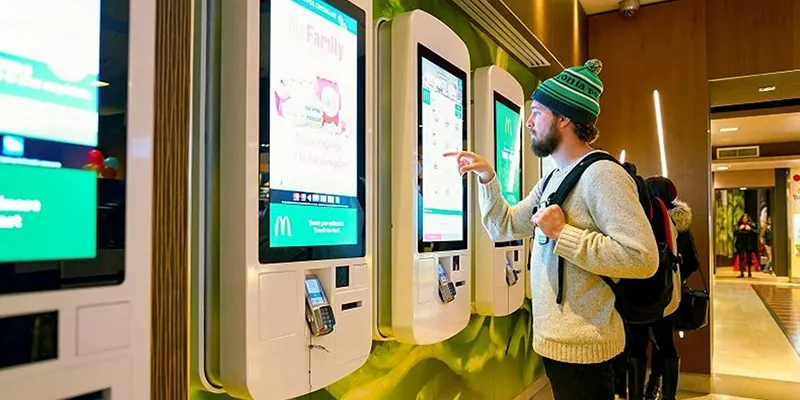
Self service ordering kiosks are the most visible type. Fast food restaurants use these units to let customers browse menus, customize orders, and pay without queuing. Data from 2025 shows major chains route over 40 percent of orders through self service stations. Customers who use these terminals tend to spend more because the screen displays items visually.
Wayfinding kiosks help people navigate large spaces like malls, hospitals, and airports. Users search for a store or room and receive directions. An interactive unit reduces the need for information desk staff. Information and advertising kiosks deliver content in public spaces. A unit in a hotel lobby can show local attractions or promotions. Check in kiosks automate administrative tasks in healthcare, hotels, and event venues, reducing front desk wait times by up to 60 percent.
3. Where Digital Kiosk Machines Are Used
Retail is the largest market. Stores use digital kiosk machine units for endless aisle ordering, allowing customers to order out of stock items for home delivery. Price check stations let shoppers scan items for details. Department stores use wayfinding terminals for multi floor navigation.
The food service industry has embraced self service technology as core operations. Beyond fast food, casual dining restaurants are installing table side tablets for ordering and payment. Stadiums use self service units for concession ordering. The hospitality sector uses these systems for guest check in, room key dispensing, and concierge requests.
Healthcare facilities deploy digital kiosk machines for patient intake and appointment scheduling. Government buildings use units for form processing and fee payment. Transportation hubs including airports and train stations use self service systems for ticketing and wayfinding.
4. What to Consider When Choosing a Digital Kiosk Machine
Hardware depends on where the unit will operate. An outdoor digital kiosk machine needs weatherproof construction, high brightness of 1500 to 3000 nits, and thermal management. An indoor unit in a controlled environment can use standard panels. Getting the specification wrong means premature failure.
Software determines user experience. A terminal with confusing software will frustrate users and see low adoption. The best interfaces use minimal steps per task, clear hierarchy, and visible feedback. Cloud based management is essential for multi unit deployments.
Form factor affects interaction. Wall mounted digital kiosk machine units save floor space for wayfinding. Freestanding installations support larger screens and peripherals. Countertop units suit ordering applications in tight spaces.
Total cost of ownership includes software licensing, installation, maintenance, and repairs. A cheap unit with high failure rates often costs more over three years than a premium one. Spare parts availability and local service coverage affect ongoing reliability.
5. Future Trends in Digital Kiosk Machine Technology
Artificial intelligence is enhancing what these terminals can do. Smart units can recognize returning customers and personalize the interface. Early adopters of AI powered systems report conversion lifts of 15 to 25 percent. Voice enabled interfaces and gesture recognition are expanding interaction beyond touch.
Contactless interaction has become a baseline expectation. Modern systems support QR scanning, mobile wallet payments, and gesture navigation. A touchless unit appeals to health conscious users and works well where hygiene matters.
Integration separates basic deployments from sophisticated ones. A terminal connected to point of sale systems, inventory databases, and CRM delivers more value than an isolated unit. Enterprise buyers prioritize API availability and middleware compatibility.
Sustainability is becoming a differentiator. Energy efficient designs use LED backlights with automatic brightness adjustment. Modular construction allows component upgrades rather than full replacement. Repairable systems gain preference among environmentally conscious buyers.
Conclusion
A digital kiosk machine is a self service interactive terminal that helps businesses automate transactions, provide information, and improve customer flow. Success depends on choosing the right hardware, designing intuitive software, and selecting a vendor with strong support. As AI and contactless features advance, the digital kiosk machine will become even more capable and more common in the years ahead.
FAQ
1. How much does a digital kiosk machine cost?
A: An indoor digital kiosk machine starts around $1,500 to $3,000. Outdoor units with weatherproofing range from $4,000 to $8,000. Enterprise installations with custom software can exceed $10,000. Volume discounts apply.
2. How long does a digital kiosk machine last?
A: A commercial digital kiosk machine lasts 3 to 5 years. LED backlights are rated at 30,000 to 50,000 hours. Outdoor units may have shorter lifespans. Modular designs extend service life through component replacement.
3. Can I update content on a digital kiosk machine remotely?
A: Yes. Most systems include cloud based management for remote updates. Operators can schedule changes and deploy software from a central dashboard without on site staff.
4. Do digital kiosk machine systems work outdoors?
A: Yes with the right specifications. Outdoor installations need high brightness displays, IP65 enclosures, thermal management, and anti glare treatment. They cost more but provide reliable 24/7 operation.
5. What maintenance does a digital kiosk machine require?
A: Routine maintenance includes cleaning the touch screen, replacing air filters, and applying software updates. Outdoor units need more frequent filter cleaning and seal inspection. Quarterly maintenance is recommended.