
What Is a Public Kiosk?
A public kiosk is one of the most important innovations in modern self-service technology, transforming the way people interact with businesses, institutions, and public services. In today’s fast-paced digital environment, customers expect instant access to information, faster service, and reduced waiting times. Public kiosks help meet these expectations by allowing users to complete tasks independently without needing direct assistance from staff.
The rise of public kiosks is closely linked to digital transformation and automation trends across industries. Businesses are under pressure to reduce operational costs while improving customer satisfaction. Public kiosks solve this challenge by automating repetitive tasks and freeing staff to focus on more complex responsibilities. At the same time, they provide users with 24/7 access to essential services.
Modern kiosks are far more advanced than earlier versions. They now include high-definition touchscreens, cloud-based software, secure payment systems, AI-driven features, and real-time data synchronization. These improvements make them more reliable, scalable, and user-friendly.
As industries continue to evolve, public kiosks are becoming a core part of customer service strategies worldwide. Understanding how they work, where they are used, and what benefits they provide is essential for any business looking to improve efficiency and customer experience.
What Is a Public Kiosk?
A public kiosk is a self-service electronic terminal placed in public or commercial environments that allows users to access information or complete transactions without human assistance. These systems are designed to simplify user interaction and improve service efficiency across multiple industries.
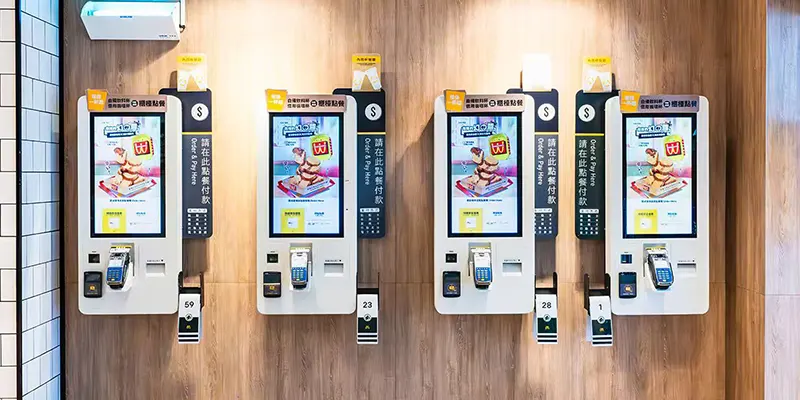
Public kiosks typically feature a touchscreen display, an embedded computer system, and specialized software that performs specific functions such as ticketing, ordering, payment processing, or information retrieval. Depending on the application, they may also include printers, barcode scanners, cameras, or card readers.
The main purpose of a public kiosk is to reduce dependency on manual service while improving speed and accuracy. Users can complete tasks quickly by following simple on-screen instructions. This not only enhances convenience but also reduces operational pressure on staff.
Today, public kiosks are widely used in retail stores, transportation hubs, healthcare facilities, and government institutions. Their flexibility allows them to adapt to different industries and service requirements.
Key Components of a Public Kiosk
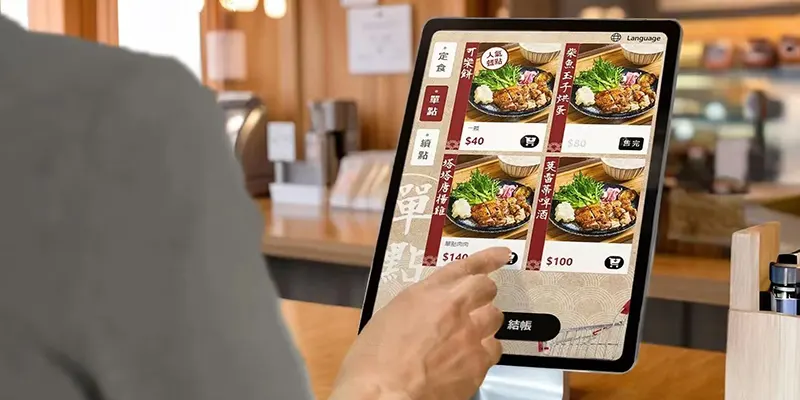
A public kiosk consists of several integrated components that work together to deliver a seamless user experience. The most visible part is the touchscreen display, which serves as the main interface for users. These displays are designed to be durable, responsive, and suitable for continuous public use.
Inside the kiosk, an industrial computer or media player runs the operating system and application software. This system processes user input and communicates with backend databases or cloud platforms. Many kiosks also rely on internet connectivity, enabling real-time updates and remote management.
Additional components may include printers for receipts, scanners for QR codes, payment terminals for transactions, and cameras for identification purposes. The physical enclosure protects internal hardware from damage and ensures secure operation in high-traffic environments.
How Public Kiosks Work
Public kiosks operate by combining user interaction with automated backend processing. When a user interacts with the touchscreen, the system sends requests to a server or database, processes the information, and delivers results instantly.
For example, in a transportation kiosk, a user can search for routes, select tickets, and make payments in a single workflow. The kiosk communicates with ticketing systems to confirm availability and generate digital or printed tickets.
Modern kiosks often support cloud-based platforms, allowing businesses to manage content and monitor performance remotely. This ensures consistency across multiple locations and reduces maintenance costs. Some advanced kiosks also use AI to personalize content based on user behavior or preferences.
Types of Public Kiosks
Public kiosks come in different forms depending on their purpose and industry application. Each type is designed to handle specific tasks efficiently while improving customer experience.
Information Kiosks
Information kiosks provide users with access to essential data such as maps, directories, schedules, and service details. They are commonly installed in shopping malls, airports, hospitals, and public buildings.
These kiosks help visitors navigate complex environments by offering interactive search functions and visual guidance. Users can quickly locate stores, departments, or facilities without asking for assistance. Many systems also support multilingual interfaces and accessibility features.
Self-Service Payment Kiosks
Payment kiosks allow users to complete financial transactions independently. They are widely used in parking systems, retail stores, government offices, and utility service centers.
These kiosks support multiple payment methods, including credit cards, mobile wallets, and contactless options. They improve transaction speed and reduce queues, especially during peak hours. Businesses also benefit from improved accuracy and reduced manual workload.
Benefits of Public Kiosks
Public kiosks provide significant advantages for both businesses and customers. They improve service efficiency, reduce costs, and enhance user satisfaction across various industries.
Improved Customer Convenience
One of the biggest advantages of public kiosks is convenience. Users can access services instantly without waiting in line or interacting with staff. This self-service approach gives customers more control over their experience and reduces frustration in busy environments.
Kiosks are designed with simple interfaces that guide users step by step, making them accessible even for first-time users. This ease of use improves overall customer satisfaction and encourages repeat usage.
Reduced Operating Costs
Businesses benefit from lower operational costs when using public kiosks. By automating routine tasks such as ticketing, ordering, or payments, companies can reduce the need for additional staff.
This allows employees to focus on more important tasks that require human attention. Over time, kiosks help organizations save money while improving service quality and efficiency.
Conclusion
Public kiosks have become an essential part of modern service systems, offering a powerful combination of convenience, efficiency, and automation. They enable users to complete tasks quickly while helping businesses reduce costs and improve operational performance. From retail stores to transportation hubs, these systems are transforming how services are delivered in almost every industry.
As technology continues to advance, public kiosks will become even more intelligent and interactive. Features such as artificial intelligence, cloud connectivity, and contactless interfaces will further enhance their capabilities. For businesses looking to improve customer experience and stay competitive, investing in public kiosk solutions is no longer optional—it is a strategic necessity.
FAQs
1. What is a public kiosk used for?
A public kiosk is used for self-service tasks such as information access, payments, ticketing, ordering, and check-in services.
2. Where are public kiosks commonly found?
They are commonly used in airports, malls, hospitals, hotels, retail stores, and government buildings.
3. Are public kiosks easy to use?
Yes, most kiosks are designed with simple touchscreen interfaces that guide users step by step.
4. Do public kiosks reduce business costs?
Yes, they help reduce staffing costs and improve operational efficiency by automating repetitive tasks.
5. What is the future of public kiosks?
Future kiosks will include AI features, contactless interaction, and cloud-based management systems for smarter service delivery.